

Quick answer: Navigation on an Instagram Story is the set of actions viewers take while watching: Forward (skip to your next slide), Back (rewatch the previous one), Next story (jump to another account), and Exited (leave Stories entirely). Instagram counts each action in Insights, showing where your content holds attention and where it loses people.
This guide decodes every Instagram story navigation metric in plain English, shows where to find the data, and explains how to act on what you see.
Stories are a core channel for creators and influencer marketing alike. But success isn't just about views. How people move through your frames, whether they skip, rewatch, or leave, reveals true engagement far better than a raw view count ever could.
What Does Navigation Mean on Instagram Stories?
Instagram story navigation refers to the actions users take while viewing Stories. Instagram tracks these behaviors in Insights, and together they reveal how audiences engage with each frame.
The Four Navigation Actions
- Forward: the viewer taps to skip to the next slide within your story (you'll also see this called taps forward)
- Back: the viewer taps to rewatch a previous slide
- Next story: the viewer swipes to another account's story
- Exited: the viewer leaves the Stories, the viewer entirely
These four signals form the foundation of understanding how your content performs beyond simple view counts. Two of them, Forward and Back, happen inside your story. The other two, Next story and Exited, mean the viewer left you. That distinction shapes everything else in this guide.
How to Navigate Instagram Stories: Taps, Swipes and Pauses
Before decoding the metrics, it helps to know the gestures that create them. Every number in your Insights maps back to one of these physical actions.
| Gesture | What it does | What Insights records |
|---|---|---|
| Tap the right side of the screen | Skips to the next slide in the current story | Forward |
| Tap the left side of the screen | Replays the previous slide | Back |
| Press and hold | Pauses the story | Not counted as navigation |
| Swipe left | Jumps to the next account's story | Next story |
| Swipe right | Returns to the previous account's story | Viewed on their side |
| Swipe down or tap the X | Closes the Stories viewer | Exited |
On desktop, arrows on either side of the story move viewers forward and back, and clicking a story pauses it. The mobile gestures above are where the vast majority of navigation actions come from, since Stories remain an overwhelmingly mobile format.
Instagram Story Navigation Metrics, Decoded
No single number tells the full story. Navigation data works best when you read the signals together, spotting patterns in how viewers move through your content rather than judging isolated actions.
Forward: Are Viewers Skipping Ahead?

A Forward means someone tapped ahead to your next slide. It's the most common navigation action, and it doesn't automatically mean viewers lost interest. It often suggests, though, that the current frame isn't engaging enough to hold their attention on its own.
High forward rates often point to:
- Slow or unengaging openings
- Overly long story sequences
- Repetitive or low-value content
Keep one thing in mind: a Forward keeps the viewer inside your story. Next story means they've moved to another account. The two get confused constantly, which is why we compare them head-to-head a little further down.
Back: The Strongest Positive Signal

A Back happens when someone returns to a previous slide. Unlike the other navigation actions, this one is almost always good news. Rewatching is intentional behavior, not passive viewing.
This usually means:
- The content is valuable or interesting
- Viewers want to rewatch it or understand it better
- The message resonates
Content that earns Back taps tends to include educational insights, detailed visuals, or important announcements. If one slide collects noticeably more of them than the rest, study it. That's your audience telling you what to make more of.
Exited: Why Viewers Leave Stories Entirely
Exited counts the moments viewers close the Story viewer completely. Some exits are natural, since everyone stops watching eventually. But a spike on a specific slide is one of the clearest signs that something in the experience caused viewers to disengage.
Common causes include:
- Irrelevant or uninteresting content
- Overly promotional messaging
- Poor visual quality
Consistently high exit rates usually signal a mismatch between your content and what your audience expected to see.
Next Story: Losing Attention to Another Account

Next story actions occur when viewers swipe to a different account's story. This is a stronger negative signal than a Forward, because it reflects a clear decision to leave your content for something else.
This typically indicates:
- Your content failed to hold attention
- Competing content is more appealing
Exits may reflect fatigue or distraction. Next story swipes are competitive in nature. Reducing them is key to improving retention, especially when viewers hop quickly between multiple creators' content.
Forward vs Next Story: What's the Difference?
This is the pair that trips people up most, so here's the short version. Forward keeps the viewer inside your story. Next story means they left it.
A Forward tap moves someone from your slide two to your slide three. That's a mild signal, often just fast consumption. A Next story swipe skips everything you have left and lands on another account. That's active disinterest.
A simple decision rule we apply when reviewing story data: treat rising Forwards as a pacing problem and rising Next story swipes as a content problem. Tighten and shorten slides first. Rework hooks and topics for the second.
How to See Story Navigation Data in Instagram Insights
Where to Find It
To analyze navigation data, you need a professional account on Instagram, either Business or Creator. Once switched, the metrics live inside Instagram Insights, the platform's Stories analytics hub:
- Go to your profile, open the menu, and tap Insights
- Under Content you shared, select Stories
- Open any story and scroll to its Navigation section
While a story is still live, you can also swipe up on it to see metrics in real time. And according to Instagram's official guide to Story insights, the data stays available for up to two years after a story expires, even though the story itself disappears in 24 hours.
What Native Insights Can't Show You
- Data is fragmented across individual posts
- Comparing multiple accounts or influencers is difficult
- There's no centralized campaign tracking
For a single account, that's workable. It gets harder as your output grows, and it breaks down completely once you're tracking several creators at the same time. We'll come back to the multi-creator problem in its own section below.
Why Story Navigation Matters More Than Views Alone
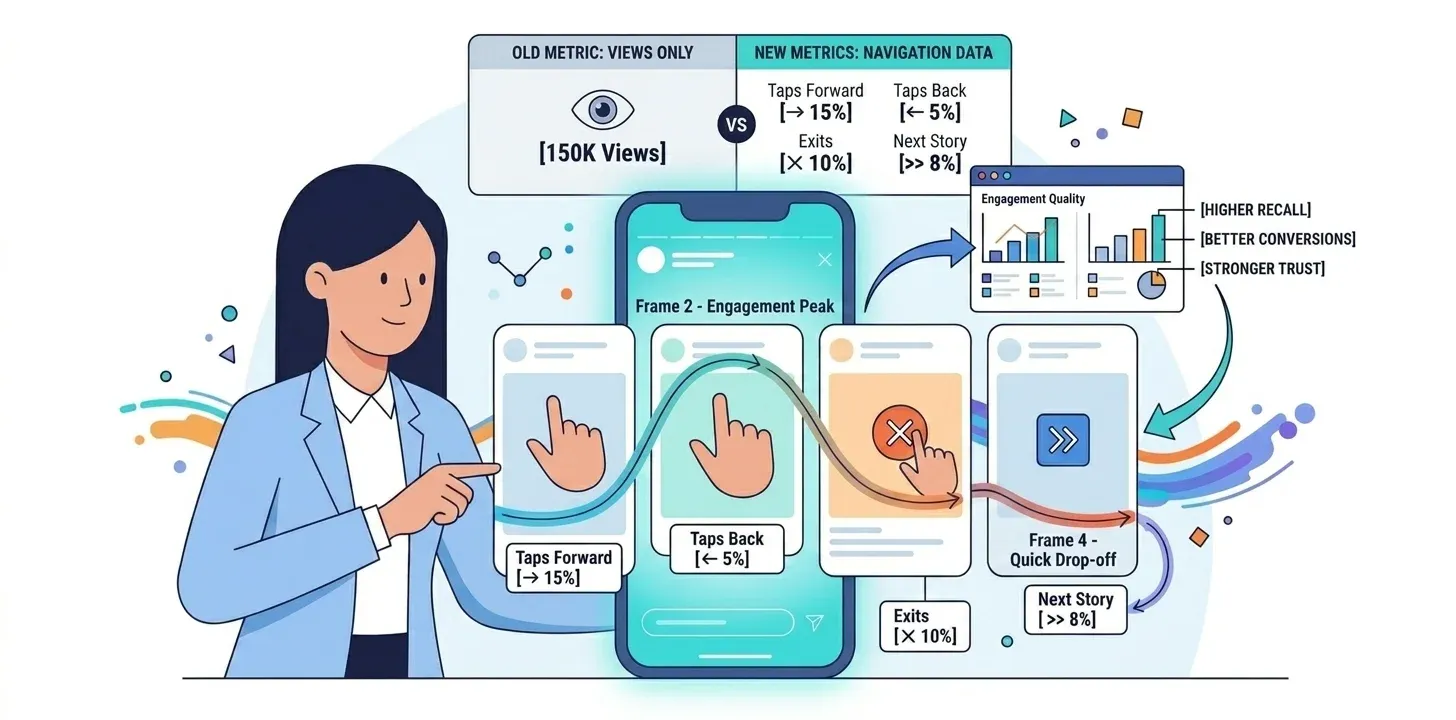
Views reflect initial reach, nothing more. They don't show whether the audience is genuinely engaged or simply passing through. Navigation adds the missing layer by capturing how users interact with each frame of the story.
Forward, Back, Exited, and Next story data reveal how attention is distributed across your content. You learn not just how many people you reached, but how effectively the message was delivered and retained. In practice, that makes navigation far more actionable: it shows whether your storytelling, pacing, and creative execution are working as intended.
High Views but Low Engagement: The Hidden Problem
Big view counts can create a misleading sense of success when strong engagement signals don't back them up. A story may achieve significant reach and still fail to hold attention if viewers skip through quickly or exit early.
Navigation metrics let you pinpoint exactly where audience interest drops. A spike in forward taps suggests the content isn't immediately relevant. A high exit rate hints at a disconnect between audience expectations and the actual message. Views alone can't diagnose either problem.
Skip this analysis, and you risk optimizing for reach rather than impact. Over time, that means inefficient campaigns, weaker audience connection, and missed opportunities to refine creative strategy around real user behavior.
Engagement Quality vs Passive Viewing
Navigation metrics reveal engagement quality, not just quantity.
- Passive viewers = low value
- Active engagement (replays, interactions) = high value
For brands running influencer campaigns, this distinction is critical. High-quality engagement leads to:
- Better brand recall
- Higher conversion rates
- Stronger audience trust
How to Improve Instagram Story Navigation Performance
Improving these numbers isn't only about better visuals. It's about understanding how viewers interact with each frame so you can reduce drop-offs, increase retention, and guide people through a story worth finishing. For brands running influencer campaigns, the same data reveals which creators and content formats actually hold attention.
1. Hook Viewers in the First Three Seconds
First impressions decide a lot. A weak opening frame triggers forward taps almost immediately, so the first slide has to capture attention fast and clearly communicate value.
Tips:
- Use bold, eye-catching visuals that stand out
- Start with a question, problem, or curiosity-driven hook
- Deliver immediate value or context to keep viewers watching
2. Use Interactive Stickers to Reduce Exits
Interactive elements turn passive viewers into active participants, which significantly cuts exit rates. When users engage with your content, they stay longer and keep watching.
Examples:
- Polls to gather opinions
- Quizzes to spark curiosity
- Question boxes to encourage responses
These features create a two-way interaction that shifts the experience from passive consumption to active engagement. That increases time spent on each frame, strengthens audience involvement, improves content recall, and produces direct feedback you can feed into future creative and campaign decisions.
3. Optimize Story Length and Flow
Structure plays a critical role in retaining attention. Too many slides, or a disjointed sequence, overwhelms viewers and increases drop-off rates.
Best Practices:
- Keep your story concise and focused
- Ensure a smooth, logical progression from one slide to the next
- Avoid repeating similar content or stretching a message too long
A well-paced story feels natural to follow and gets watched through to the end. Less cognitive load, and a smoother path toward completion and conversion.
4. Add Clear Calls to Action
Even the most engaging story falls flat without direction. Calls to action tell viewers what to do next and convert attention into interaction.
Effective CTAs:
- "Tap to learn more"
- "Reply with your thoughts"
- "Tap the link sticker for details"
One update worth flagging: the old "swipe up for details" prompt is obsolete. Instagram replaced swipe-up links with the link sticker back in August 2021, so build any link CTA around the sticker instead.
Clear, direct CTAs reduce confusion and act as conversion triggers. When the next step is explicit and effortless, far more viewers take it.
Using Data and AI to Optimize Story Navigation
Data and AI let you move past guesswork and make informed decisions about what actually works in Stories. Instead of relying on assumptions, you can identify patterns in how audiences respond to different types of content.
Tracking Navigation Trends Over Time
A single Story rarely gives you enough insight. The real value comes from tracking performance over time and spotting consistent patterns.
Tools You Can Use:
- Instagram Insights
- Google Analytics
- Scrumball's Content Performance Tracking feature
These tools track key signals such as forward rates, exits, and overall engagement. Over weeks, it becomes easier to identify which formats, topics, or storytelling styles tend to perform better.
Using AI Tools to Predict High-Performing Stories
AI is changing how content strategies are developed, especially by enabling the testing of ideas before publishing. In 2026, the latest AI models support the full IG content creation workflow:
- Generating story ideas
- Refining messaging
- Exploring different content angles
By learning from past performance data, these tools can also suggest adjustments that may improve engagement. They don't replace creative judgment, but they speed up the iteration process and reduce trial and error.
Automating Content Testing and Optimization
Improving story navigation often comes down to small, repeated experiments. A/B testing lets you compare variations and understand what actually drives better engagement.
What to Test:
- Different hooks
- Visual styles
- CTA formats
Tools like Meta Ads Manager, Later, and Buffer can automate testing and scheduling, making it easier to refine your strategy over time.
Scaling Navigation Analysis Across Multiple Creators
Everything above works well for a single account. Influencer campaigns break that model. Brands working with multiple creators consistently struggle to:
- Compare navigation metrics across accounts
- Identify top-performing influencers
- Track long-term creator performance trends
Without a centralized view, raw data never turns into actionable insight. This is where an influencer marketing platform earns its keep. Scrumball aggregates creator performance data in one place, so you can compare Story navigation across every influencer in a campaign and see which partners drive meaningful engagement rather than just reach.
Conclusion: Read the Signals, Then Act on Them
Instagram story navigation shows how audiences actually experience your content, not just how many people saw it. The real value lies in the patterns: where viewers stay, where they skip, where they leave, and what those choices tell you about your storytelling.
Start with your own Insights. Decode Forward, Back, Exited, and Next story for a few recent stories, fix the weakest slide, and repeat. As influencer campaigns scale, brands that act on these deeper engagement signals will keep outperforming those chasing surface-level metrics, and they'll spot their high-performing creators far sooner.
FAQs
What does Forward mean on an Instagram Story?
Forward means a viewer tapped the right side of the screen to skip to your next slide. It's the most common navigation action, and the viewer is still inside your story. Occasional forwards are normal fast consumption. A pile-up on your first or second slide usually means the opening hook didn't land quickly enough.
What is the difference between Forward and Next story?
Forward moves a viewer to the next slide within your own story, while Next story swipes them to a different account entirely. Forward is a mild pacing signal. Next story is a stronger sign of disinterest, because the viewer actively chose to leave. Treat rising forwards as a pacing fix and rising next-story swipes as a content fix.
What does Exited mean on an Instagram Story?
Exited means the viewer closed the Stories viewer completely, returning to their feed or leaving the app. Some exits are natural, since everyone stops watching eventually. Consistently high exits, or a spike on one specific slide, point to irrelevant content, overly promotional messaging, or weak visuals causing people to disengage at that exact moment.
How does Instagram story navigation work?
Story navigation tracks how users move through your content: Forward and Back taps within your story, plus Next story swipes and Exited actions that take viewers away from it. These behaviors show how each frame performs, helping you understand where attention drops and how effectively the story holds interest from the first slide to the last.
How do I see story navigation in Instagram Insights?
Switch to a Business or Creator account, then open Insights from your profile menu. Under Content you shared, tap Stories, select a story, and scroll to its Navigation section. You can also swipe up on a live story for real-time data. Insights stay available for up to two years after a story expires.
Why is Instagram story navigation important?
Navigation reflects real engagement, not just exposure. It helps you identify weak points, improve storytelling, and optimize content flow. That leads to better performance, stronger attention retention, and more efficient use of content and media investment, because decisions rest on how viewers actually behave rather than on how many happened to see a frame.
How to use Instagram Stories for marketing?
Treat Stories as a continuous content stream rather than one-off posts. Combine product showcases, behind-the-scenes moments, and user-generated content to keep variety high. Structure each story to guide viewers from attention to action, then test creatives against your navigation data to refine messaging over time. The metrics will show which mix your audience actually watches.
How to promote a brand on an Instagram story?
Focus on value-driven content rather than direct promotion. Show real use cases, weave in subtle calls to action, and let the link sticker carry the click. Watch Exited rates on promotional slides to catch overselling early. Tools like Scrumball can also help coordinate campaigns and track engagement across every creator involved.
How to increase brand awareness on Instagram?
Brand awareness grows through consistent exposure and recognizable content. Maintain a clear visual identity, post regularly, and collaborate with niche creators whose audiences match yours. Stories reinforce presence through repeated daily touchpoints, and healthy navigation patterns, meaning more Back taps and fewer Next story swipes, confirm the content is memorable rather than merely visible.